Choosing a Walk-Through Metal Detector for Commercial Buildings
2026-09-21 · 6 min read
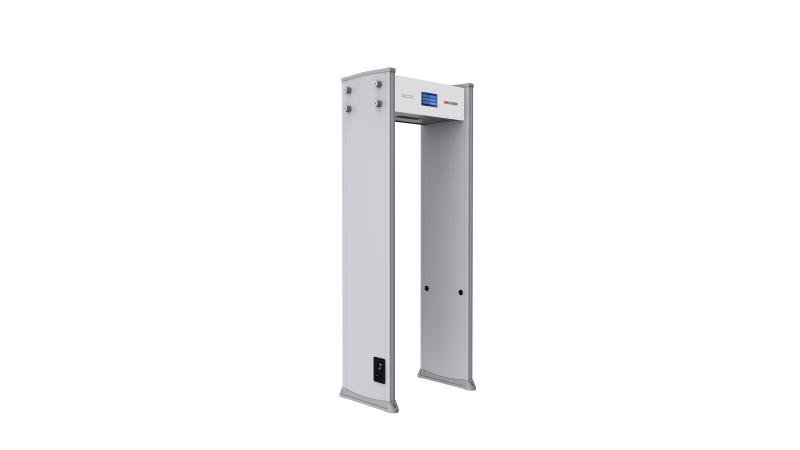
A walk-through metal detector is the workhorse of a commercial building entrance, but choosing the right one is rarely about the spec sheet alone. Detection zones, throughput at peak hours, sensitivity tuning, and where the arch physically sits in your lobby all decide whether screening feels smooth or becomes a daily bottleneck. This guide walks through the practical choices property and facilities teams face when specifying an archway metal detector for office building entrance screening and lobby security.
Key takeaways
- Match the number of detection zones to your foot traffic and how fast you need to clear alarms, not to the highest spec available.
- Plan throughput around your busiest 15-minute window, not the daily average.
- Sensitivity is a balance — too high creates false alarms that slow the line and tire out guards.
- Placement, power backup, and clearance matter as much as the detector itself.
- Pair the arch with access control and CCTV for a single, reviewable entrance record.
Where walk-through detectors fit in a building’s entrance plan
A walk-through metal detector is the first active layer at a commercial building entrance. It sits between the door and the lobby, screening every person who enters before they reach elevators, tenant floors, or shared amenities. In most office and corporate setups it works alongside a reception desk, a guard team, and an access control system that logs who came in and when.
The detector does not replace people — it gives the guard team a consistent, repeatable signal instead of relying on visual judgement alone. That matters most during the morning rush, when a steady stream of employees, contractors, and visitors passes through in a short window.
Detection zones and what they mean for pinpointing
Walk-through detectors are commonly described by their number of detection zones — 6, 12, 18, or 33. Zones divide the archway into horizontal bands, so when someone triggers an alarm the unit shows roughly where on the body the metal is. A 6-zone model tells an operator “chest level”; a 33-zone model narrows that to a much smaller band, which speeds up the secondary check with a handheld wand.
More zones are not automatically better. A small office entrance with modest foot traffic may be well served by a 6- or 12-zone arch, while a high-rise lobby or a building that hosts large events typically benefits from the faster resolution of an 18- or 33-zone model. The right choice depends on how quickly you need to clear each alarm, not on the zone count alone.
Throughput and queue planning at peak hours
Throughput is the number that determines whether your lobby stays calm at 8:30 a.m. or backs up onto the sidewalk. Manufacturers commonly quote a per-minute rate under ideal conditions, but real-world throughput is lower once bags, coats, and secondary checks are factored in. Plan around your busiest 15-minute window, not the daily average.
If a single arch cannot clear your peak, the usual fixes are a second arch in parallel, a dedicated visitor lane separate from the employee lane, or moving bag screening to an X-ray scanner so the arch handles people only. The corporate facilities entrance pattern is a useful reference point for sizing this correctly.
Sensitivity, false alarms and calibration
Sensitivity determines what the detector will flag. Set it too low and a threat item can pass unnoticed; set it too high and everyday objects — keys, belt buckles, steel-toed shoes — generate a constant stream of false alarms that slow the line and erode guard attention. Most commercial detectors let you adjust sensitivity per zone and store preset programs for different threat levels.
Calibration is not a one-time task. Doors, rebar, and moving metal trolleys near the arch can all shift its behaviour over time, so a periodic check with a test piece — and a log of the results — is part of keeping the entrance trustworthy. Hedged wording applies here: follow the manufacturer’s calibration guidance and any applicable building administration rules, and confirm current requirements with your property team.
Placement, power, cabling and clearance
Where the arch sits affects both detection accuracy and queue flow. Keep it away from large metal masses (lift shafts, structural steel, metal doors) that can interfere with the field, and leave enough room for a waiting lane plus a marked secondary-check spot a few steps away. Most units need a dedicated mains outlet and, ideally, battery backup so a brief power dip does not force the entrance to close.
Cabling should be routed so it cannot be tripped over or unplugged accidentally, and the arch should be anchored so it cannot tip. If you manage multiple buildings, a consistent placement standard across property management sites makes guard rotation and maintenance far simpler.
Procurement checklist
Use this checklist as a starting point when comparing walk-through metal detector options for a commercial building. Confirm specifics with the supplier against your actual entrance.
| Consideration | What to confirm |
|---|---|
| Detection zones | 6, 12, 18 or 33 zones — more zones pinpoint the height of an alarm |
| Throughput | Confirm people-per-minute at your busiest arrival window |
| Sensitivity controls | Adjustable per zone, with preset programs for different threat levels |
| Alarm indication | Side lights and a zone display that operators can read at a glance |
| Power | Mains with battery backup so a brief outage does not stop screening |
| Clearance | Allow space for the arch, a waiting lane, and a secondary check spot |
| Integration | Pair with access control and CCTV for a single entrance record |
Frequently asked questions
How many detection zones do we actually need for an office lobby?
It depends on your foot traffic and how fast you need to clear alarms. A 6- or 12-zone arch is often enough for a smaller office entrance, while high-rise lobbies and event buildings typically benefit from 18 or 33 zones because operators can resolve an alarm to a smaller area and keep the line moving.
Can a walk-through detector screen bags as well as people?
Walk-through detectors are designed for people, not bags. Bags are usually screened separately with an X-ray baggage scanner, or handed to a guard for a visual check. Splitting people and bags into parallel lanes is the most common way to keep throughput high at peak hours.
What happens to screening during a power outage?
Most commercial detectors run on mains power, so a battery backup or UPS keeps the entrance running through a brief outage. Without backup, the arch goes offline and the guard team falls back to handheld screening until power returns. Plan the power arrangement before installation, not after.
Getting started
If you are specifying an arch for a new lobby or reviewing coverage across an existing portfolio, our team can map your entrance volumes to the right detector and layout.